
Production rarely arrives in one neat format.
It arrives as a call sheet, a revised script, a camera report, a half-finished schedule, a supplier email, a handwritten note, an overtime calculation and three different versions of the same document.
Workflow is built for that reality.
Workflow is a new production management app for Mac from Rush Mind / rushes ltd. It brings projects, schedules, stories, paperwork, freelance tools and specialist production utilities into one local-first studio on your computer.
It is designed for film and television productions across every department. It can also be used for other creative, technical or project-based work.
And, for now, Workflow is free.
Workflow 1.0.39: available now
The latest release is Workflow 1.0.39, released on 23 August 2026.
It is a universal Mac build, supporting:
- macOS 11 or newer
- Apple silicon Macs
- Intel Macs
- Localised, non-cloud use
- Offline work on location, at home or in the production office
Workflow is freeware at the moment. Pricing is coming soon, and cloud features are planned for the future. The current version is free to download and use for localised, non-cloud work.
That is not a hidden trial. It is not a free account designed to push you towards a subscription on day one.
You can download it now and start building your own workspace.
A production studio, not another browser tab
Cloud production platforms can be useful, particularly when a large team needs shared access. But they also introduce practical dependencies:
- You need a reliable internet connection.
- Your work sits inside someone else’s platform.
- Collaboration and storage are often tied to monthly plans.
- Costs can increase as more people need access.
- Offline working may be limited to exported files or partial functionality.
For context, StudioBinder plans are commonly listed in the region of $29–$99 per month, with additional users costing around $25 per user per month. Movie Magic Scheduling is a more traditional desktop option, with pricing often discussed around $29 per month for introductory access or approximately $200–$280 per seat per year, depending on the licence and offer.
These products serve different needs. This is not a claim that one tool replaces everything else.
Workflow takes a different position:
Put the production tools on your Mac. Keep your working data on your Mac. Do not require the cloud to make the software useful.
That matters when you are working on a remote location, travelling between units, dealing with restricted production networks or simply trying to keep control of your own files.
Your data stays where you put it
Workflow workspaces are self-contained.
Your project and data folders are kept separately from the application itself. When Workflow updates, the app is replaced : your data folder stays put.
That means:
- Updating the software should not wipe your projects.
- Reinstalling the app does not mean starting again.
- Your production information remains local.
- You can organise workspaces around productions, clients, departments or personal projects.
- You are not forced to upload your material to use the core app.
Workflow also operates without advertising and third-party analytics. The purpose is straightforward: help you organise the work without turning your production data into somebody else’s business model.
You should still back up important production data. Local-first does not mean backup-proof. Use your normal security, storage and backup procedures.
Built for the whole production
Workflow is not limited to one department’s paperwork.
It is relevant to:
- Camera
- DIT and Data
- Editorial
- VFX
- Colour and Grade
- Production
- Assistant Directors
- Script and Continuity
- Sound
- Art Department
- Locations
- Post Production
- Freelancers and independent creatives
The app gives you a shared structure without insisting that every department works in exactly the same way.
Capture work quickly
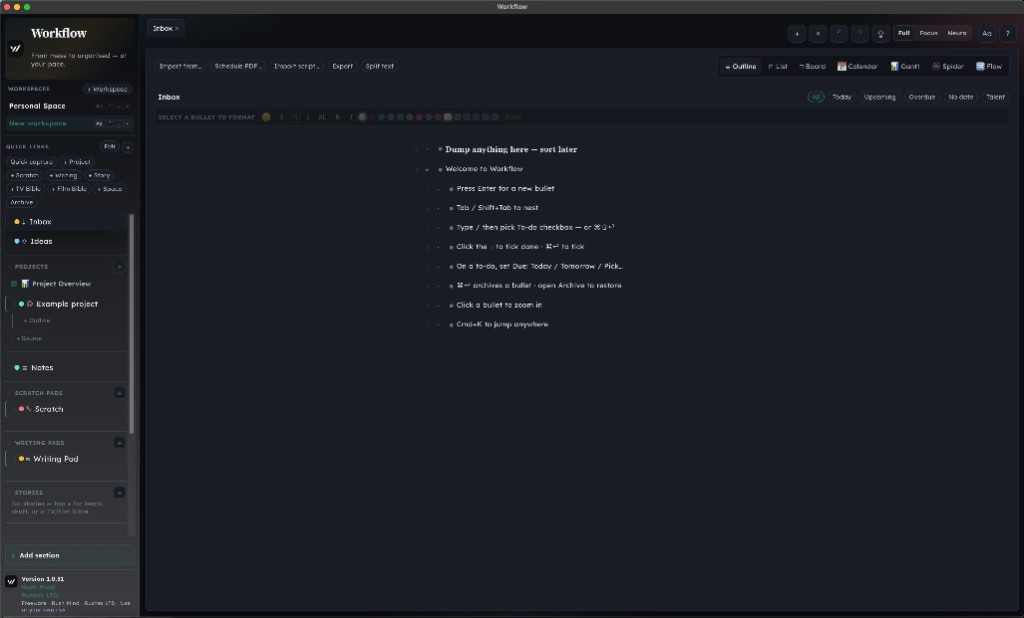
The Inbox is designed for the material that lands suddenly:
- Notes
- Ideas
- Todos
- Dates
- Reminders
- Follow-ups
- Files to process later
You can organise information into outlines, lists, boards, calendars, Gantt views, spider diagrams and flow views. Archive information rather than deleting it, and use quick capture when you do not have time to stop and build the perfect system.
See the whole project
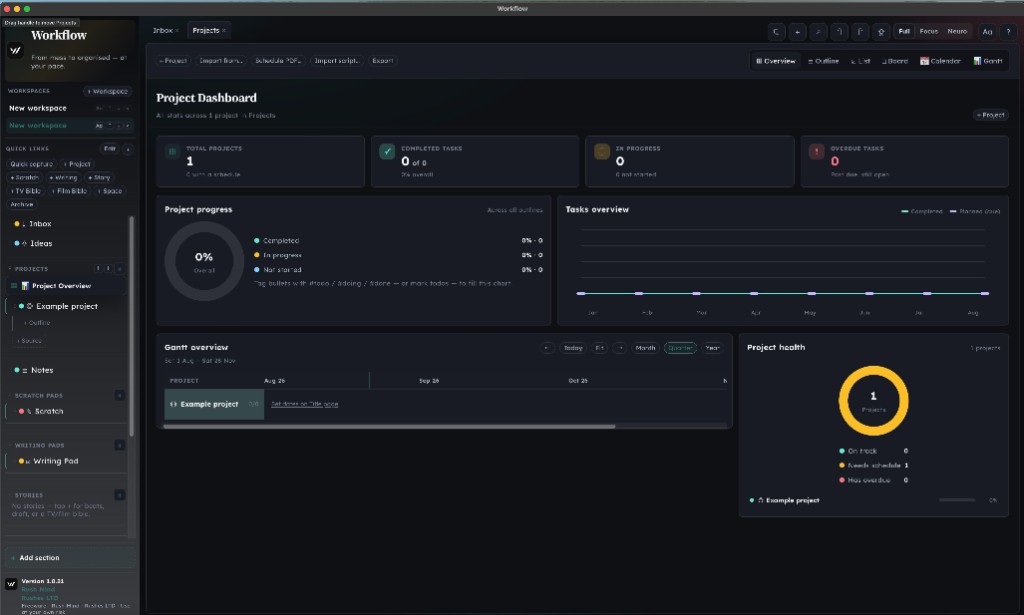
The Project Overview brings key information together:
- Project totals
- Progress
- Completed tasks
- Work in progress
- Overdue tasks
- Gantt timelines
- Project health
Tagging bullets with #todo, #doing or #done allows the project charts to update as the work develops.
This is useful when a production has moved beyond a list of intentions and needs a visible picture of what is actually happening.
Keep the paperwork attached to the work
The Repository lets you drop in:
- Call sheets
- Sides
- Risk assessments
- Logs
- Frame leaders
- Reports
- Other production documents
Workflow copies the originals as-is, labels them for the relevant project and records a date or date range that you can edit.
That gives you a practical way to keep the paperwork connected to the production rather than scattered across downloads folders, email threads and temporary desktop files.
Story Studio for writers, directors and development teams
Workflow also includes Story Studio.
You can work with:
- Story beats
- Drafts
- Script Reader tools
- Cast and scene information
- TV bibles
- Film bibles
- Imported scripts
Workflow can import Final Draft, PDF and Fountain files, then break a script into scenes that you can rename, move or delete.
For directors, producers, writers and development teams, this provides a way to connect story development with the practical project structure around it.
A script is not separate from the production forever. At some point it becomes a schedule, a breakdown, a budget conversation, a crew requirement and a set of decisions.
Workflow is designed to help you see those connections earlier.
Specialist tools for DIT, post and freelance work
Workflow includes tools that reflect real production tasks rather than generic productivity language.
DIT and post-production tools
Available tools include:
- ALE editor
- MHL checksum checks
- Edit logs
- Lens metadata matching
- Camera reports
- LTO logs
- LUT and CDL tools
- Frame Leader for digital and film charts
- Website Builder
- HDD Checker
- Barcode tools
The Lens Metadata matcher can work with UMC-4 and DCS LDT data and export to ALE. The Frame Leader supports digital and film charts, frame lines and camera handoff exports.
These are practical utilities for the moments when a production needs something specific, quickly and without opening another subscription service.
Freelance tools
Freelancers can use Workflow for:
- Overtime tracking
- Weekday, Saturday and Sunday rates
- UK tax estimates
- Job-linked overtime records
- Lens metadata
- HDD checking
- Barcode work
- Personal project organisation
The overtime stopwatch is especially relevant when your working day does not finish when the call sheet says it should.
You still need to check calculations against your contract, payroll arrangements and tax obligations. Workflow is a working aid, not financial, legal or tax advice.
A clearer interface for different kinds of attention
Production work often involves long days, interruptions and too much information arriving at once.
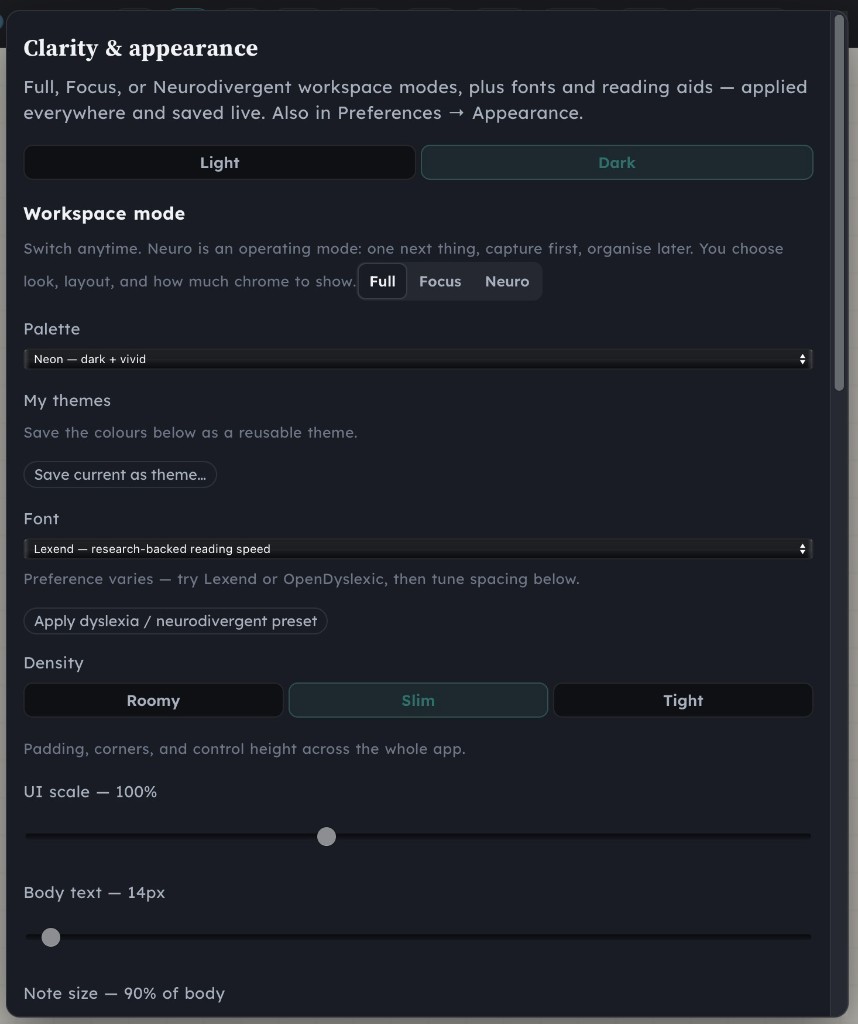
Workflow includes three Clarity modes:
- Full : the complete studio interface
- Focus : the current view without unnecessary distraction
- Neuro : a simplified working environment with adjustable layout and presentation
The Neuro mode includes built-in helpers such as:
- Reading ruler
- Lookalike-word flags
- Adjustable zoom
- Writing lane
- Lexend
- Andika
- OpenDyslexic
- Custom saved themes
- Colour and density controls
This is a practical part of the design, not a marketing label. People process information differently. A production tool should give you some control over how that information is presented.
What Workflow is : and what it is not
Workflow is:
- A Mac production management app
- Local-first and usable offline
- A place for project planning and production paperwork
- A toolkit for production, post and freelance work
- Free at the moment for localised non-cloud use
- Built around real film and television workflows
Workflow is not:
- A guaranteed replacement for every specialist production system
- A cloud collaboration platform in its current version
- A substitute for proper production backups
- Financial, tax, legal or mental health advice
- A promise that software alone will fix an unhealthy production culture
That last point matters.
Better organisation can reduce avoidable friction. It can help you see deadlines, files and unfinished work more clearly. But burnout, poor communication and unsafe working conditions require human decisions and organisational action.
If you are dealing with sustained pressure, Workflow can be one practical support among others. Rush Mind also provides professional coaching for filmmakers, creative career coaching and support around work-life balance for filmmakers, burnout and mental health in the film industry.
No software can have that conversation for you. Sometimes you need a confidential person who understands the environment.
Get started in three steps
01. Download Workflow
Visit the Workflow download page and download the current Mac build.
02. Install it in Applications
Workflow is not distributed through the Mac App Store. Move it into your Applications folder.
If macOS asks for permission, control-click the app, choose Open, then choose Open again. You may also need to use System Settings → Privacy & Security → Open Anyway.
03. Open the tour and build a workspace
Once installed:
- Accept the terms.
- Open Help → Tour.
- Create or choose a workspace.
- Add an Inbox item, project or story.
- Import the files you already need to organise.
You decide how much of the app to use. Start with one production, one department or one recurring task. No pressure to rebuild your entire system in a morning.
Finally, a tool that understands the work
Workflow comes from someone who has worked in the environment it is designed for.
James brings more than 18 years of experience across cinematography, DIT and workflow support on high-profile productions. That experience informs the app’s focus on real documents, real handoffs, real deadlines and the unglamorous administrative work that lands on freelancers and crew.
The goal is not to make production look tidy from a distance.
The goal is to make the work easier to find, understand and move forward.
Workflow is free right now. It is local. It works offline. It is built for Mac.
Download Workflow 1.0.39 today
For more about the wider Rush Mind approach, visit the Rush Mind apps page, read about James, or get started with coaching if you need support with the career and personal pressures around creative work.